Foldable LED Poster Buying Guide
Compare folding LED poster formats, indoor/outdoor versions, linked layouts, transport access and complete equipment quotes for exhibitions and showrooms.
Choose around the display task and the move
To choose a foldable LED poster, define where it will operate, what it must display, whether units will work independently or as one linked screen, and the route between storage and the display position. Then compare the complete assembly and equipment scope. For exhibitions and showrooms, this connects the buying decision to both the audience and the crew who will move and operate the display.
- For one portrait display, prepare the actual name graphics, product images or video and identify the audience positions.
- For several independent posters, list the content and playback requirement for each position.
- For a linked LED poster video wall, define the arrangement, native canvas and control package together.
- Choose the documented indoor or outdoor version before comparing brightness, weight, packing and price.
Compare PixelFold Pro and PixelFold X by configuration
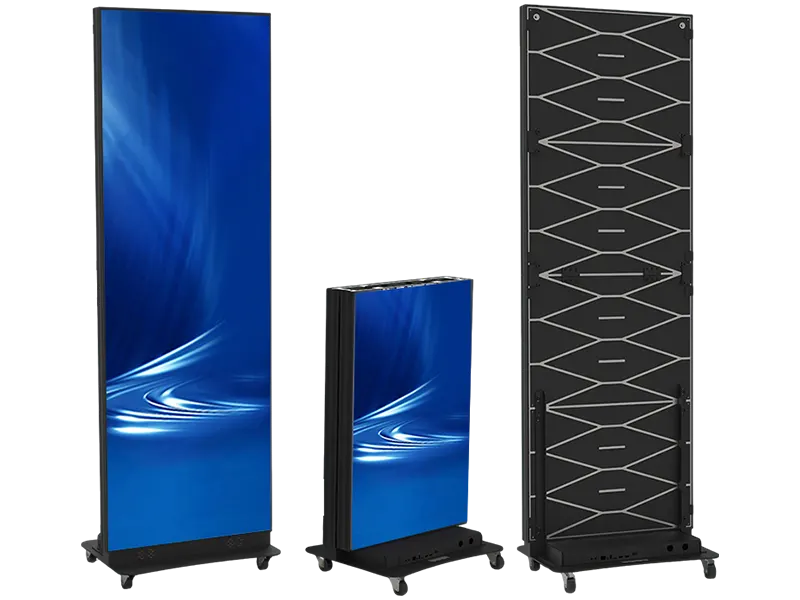
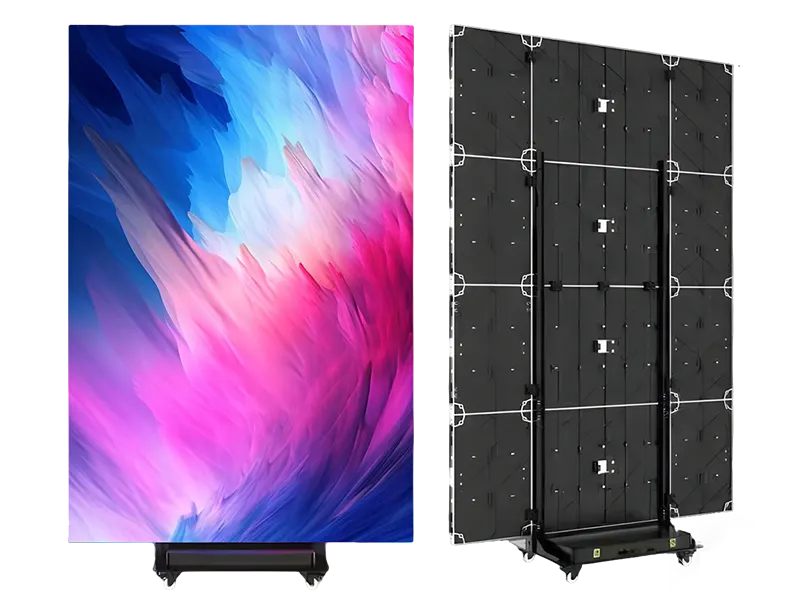
PixelFold Pro and PixelFold X are two starting points for a folding display purchase. Compare them against the same content and movement brief. The figures below describe the currently listed display configurations; shipping cases, bases, control equipment and other accessories need their own quotation lines. Listed display weight is not the packed freight weight or the full installed assembly weight.
| Buying question | PixelFold Pro | PixelFold X |
|---|---|---|
| What operating environment is listed? | Separate indoor and outdoor versions | Indoor configuration with IP30 listed protection |
| What is the format starting point? | 640 × 1920 mm LED poster format | Folding mobile assembly; specify the unfolded and folded dimensions for the selected arrangement |
| What folding or movement features are described? | Folding presentation and multi-unit tiling options | Vertical and sideways folding options; braked swivel casters |
| What display weights are recorded? | Indoor 47.5 kg; outdoor 62 kg | 95 kg |
| What service direction is listed? | Indoor front; outdoor front/rear | Front maintenance |
| What belongs in the layout review? | Operating version, unit quantity, linked layout, processor and case arrangement | Operating position, movement route, folding arrangement, linked layout and case dimensions |
Distinguish an LED poster from LCD digital signage
An LED poster in this guide uses direct-view LED modules: the LEDs form the displayed image. An LCD signage display uses a liquid-crystal panel with a backlight, which may itself use LEDs. The word LED in a listing therefore needs a technology check. Compare the exact display size, native resolution, content legibility, operating conditions and complete assembly for the job. Neither technology label establishes that a particular unit folds, can operate outdoors or can join another unit into one canvas. Ask for those functions in the exact product specification. The manufacturer reference below explains the display-technology distinction; our product choices are the PixelFold configurations linked with this guide.
Plan one poster, separate posters or a linked canvas
Independent posters can each have their own content brief. A linked layout needs an agreed physical arrangement, compatible units and a pixel map for the whole display. Specify whether content is repeated, independently scheduled or spread across the linked canvas. A folding mechanism alone does not establish the control behavior. The following is an illustrative pixel-mapping exercise using hypothetical 192 × 576 pixel units, not a listed PixelFold pixel specification. It assumes a configuration agreed to support side-by-side linking.
- Replace the example pixels with the native dimensions of the exact quoted units.
- Keep single-unit resolution, assembled resolution and the accepted input format as separate entries in the quote.
- Test a grid, edge markers, text and a short video on the agreed arrangement before accepting the content workflow.
| Illustrative layout | Native canvas in the exercise | Content decision |
|---|---|---|
| One portrait unit | 192 × 576 pixels | Prepare a portrait composition for this individual canvas |
| Three compatible units side by side | 576 × 576 pixels: 3 × 192 wide, 576 high | Prepare one square composition if the units form a linked canvas |
| A 1920 × 1080 source fitted into that square | 576 × 324 pixels of image; 126 pixels above and below | Keep the full image with unused space, or agree a different layout or crop before making the content |
Check doors, elevators and packing before ordering
A portable LED poster display still needs a complete handling and storage plan. Measure the route in the condition in which the assembly will actually travel: folded, cased, on its own base or with removable accessories packed separately. Dimensions in this worksheet are buyer inputs and supplier quotation items, rather than universal clearance limits. Include the handling procedure and the number of moves your crew expects between storage and the operating position.
| Movement stage | Record at the venue | Request for the quoted assembly |
|---|---|---|
| Loading and unloading | Vehicle access, lifting arrangements and loading height | Packed dimensions, gross shipping weight and handling instructions |
| Doors and corridors | Clear opening, turns, thresholds and available working space | Folded/cased dimensions and the required movement orientation |
| Elevators and changes of level | Door opening, internal dimensions and the venue rules for moving equipment | Complete moving-assembly weight and the agreed handling method |
| Operating and storage positions | Footprint, power/data routes and service access | Base/caster arrangement, front working space, packing and storage procedure |
Compare the complete LED poster quotation
Use one purchasing brief for competing quotations. Hold the operating environment, content task, unit quantity and linked layout constant, then compare the equipment line by line. Record included, optional and buyer-supplied items. A lower display-unit price can describe a different scope if playback, cases or linking components are omitted. Request the applicable freight and delivery assumptions for your destination separately from the display price.
| Quotation line | Specify before comparing | Keep with the order |
|---|---|---|
| Display assembly | Series, indoor/outdoor version, pitch, quantity, folding/base options and service direction | Version-specific equipment list and dimensions |
| Linked layout | Unit arrangement, assembled native pixels and compatible linking components | Annotated layout and pixel map |
| Control and playback | Processor/playback functions, inputs, content update method and buyer-supplied equipment | Signal path and agreed source/content requirements |
| Power, cabling and accessories | Included power/data cables, assembly components and matched spare parts | Itemized included/optional/buyer-supplied checklist |
| Packing and destination | Case arrangement, packed dimensions, gross weight and freight scope | Packing list and destination/delivery assumptions |
| Handover and acceptance | Who prepares content/configuration, what files are delivered and which test is agreed | Responsibility list, approved configuration and test record |
Agree the acceptance check with the purchase brief
Review the equipment using the operating and transport brief agreed for the order. Keep the selected configuration and test record so the next exhibition or showroom setup can reproduce the same workflow. These are suggested purchase checks, not a promise that every accessory or service is included.
- Review the intended portraits, fine text, product graphics and video from the relevant audience positions.
- For linked units, check the full layout, edge alignment, pixel map and the agreed content fit or crop.
- Try the planned content-update and playback method with the actual source files or devices.
- Review folding, movement, packing and service access using the agreed procedure for the supplied assembly.
- Use the separate camera-testing guide if photographs or live recording are part of the acceptance criteria.
Common questions
What is the difference between a foldable LED poster and a mobile LED display?
Foldable describes a structural arrangement; mobile describes a movement-oriented assembly. Review the exact folded dimensions, base or casters, weight and packing method. A mobile label does not establish an outdoor configuration.
Can an indoor folding LED poster be used outdoors?
Choose the version documented for the operating environment. PixelFold Pro has separate indoor and outdoor records, while the listed PixelFold X configuration is indoor IP30. Apply the complete assembly and installation requirements for the selected version.
Can folding LED posters be joined into one screen?
Specify compatible units, the physical arrangement, control components and assembled native pixels as one configuration. PixelFold Pro lists multi-unit tiling options; the quoted layout and linking scope determine how the system will operate.
Does portable mean one person can carry the display?
No crew size follows from that label. Use the supplied assembly and packed weights, dimensions, handling procedure and venue route to plan the move. Display weight alone does not describe the packed system.
Is an LED poster always better than an LCD poster for a trade show?
Compare the same display task, sample content, viewing positions, physical format, environment and complete operating scope. A technology label alone does not choose the right equipment for the booth.
What should I send for a folding LED poster equipment quote?
Send the operating environment, unit quantity, single or linked layout, sample content, movement constraints and destination. Request the exact display configuration, control/playback scope, folded and packed dimensions, cases, cables and agreed acceptance checks.
Explore related series
Technical references
These references explain technical principles. Confirm the supplied configuration against its own product specification.
Discuss your configuration
Have a question? Just leave your email and a message.